
Intelligence Gateway Secure AI
The server-side AI connection for Grafana Intelligence Gateway.
Intelligence Gateway Secure AI by DigitalRCS is purpose-built to accompany the Grafana Intelligence Gateway panel. Configure your AI provider once, keep its credentials in Grafana's encrypted data-source settings, and let your Intelligence Gateway panels use that connection without storing provider keys in dashboards.
Use local models through LM Studio, hosted models through OpenAI, Open WebUI, or another compatible Chat Completions API. Connect to a configured Grafana LLM app, or an approved published Copilot Studio agent through Direct Line. Administrators choose the connection, allowed models or agent aliases, and request limits; dashboard authors choose the data and question to analyze.
The included Docker demo does not run an AI model. Its DEMO ONLY - Mock AI (no inference) connection returns a fixed delivery receipt, not an assessment of data or images. No cloud credentials or hosted model access are included. For real analysis, configure your own reachable provider and compatible model in a separate secure data-source instance.
Built for Intelligence Gateway
The two plugins work together but have different responsibilities:
| Plugin | Role |
|---|---|
| Grafana Intelligence Gateway panel | Builds the prompt from selected Grafana query results and operational context, then displays the assessment beside your charts. |
| Intelligence Gateway Secure AI data source | Connects to the model from the Grafana server, supplies the configured credential, and applies administrator request policies. |
Together, they help operators compare traffic across sites, summarize an incident window, and prepare handovers with observations and follow-up checks. This data source is the AI connection, not the source of the metrics being analyzed. Keep using your existing metric, log, or table data sources for those queries.
Analyze data, images, or both
Use the companion panel to assess query data alone, images alone, or query data together with images. Image inputs can be a rendered dashboard snapshot, selected rendered panels, or uploaded PNG/JPEG files. Preview and remove attachments before selecting Analyze images; automatic analysis never sends images.
For an image-only assessment, turn off the panel's Include query data with images option. Keep it on to include the Intelligence Gateway panel's query results for exact numeric context. A screenshot does not automatically retrieve every pictured panel's underlying data, and image-only requests still include the configured prompt and non-secret dashboard context. The secure AI data-source instance is required in every mode.
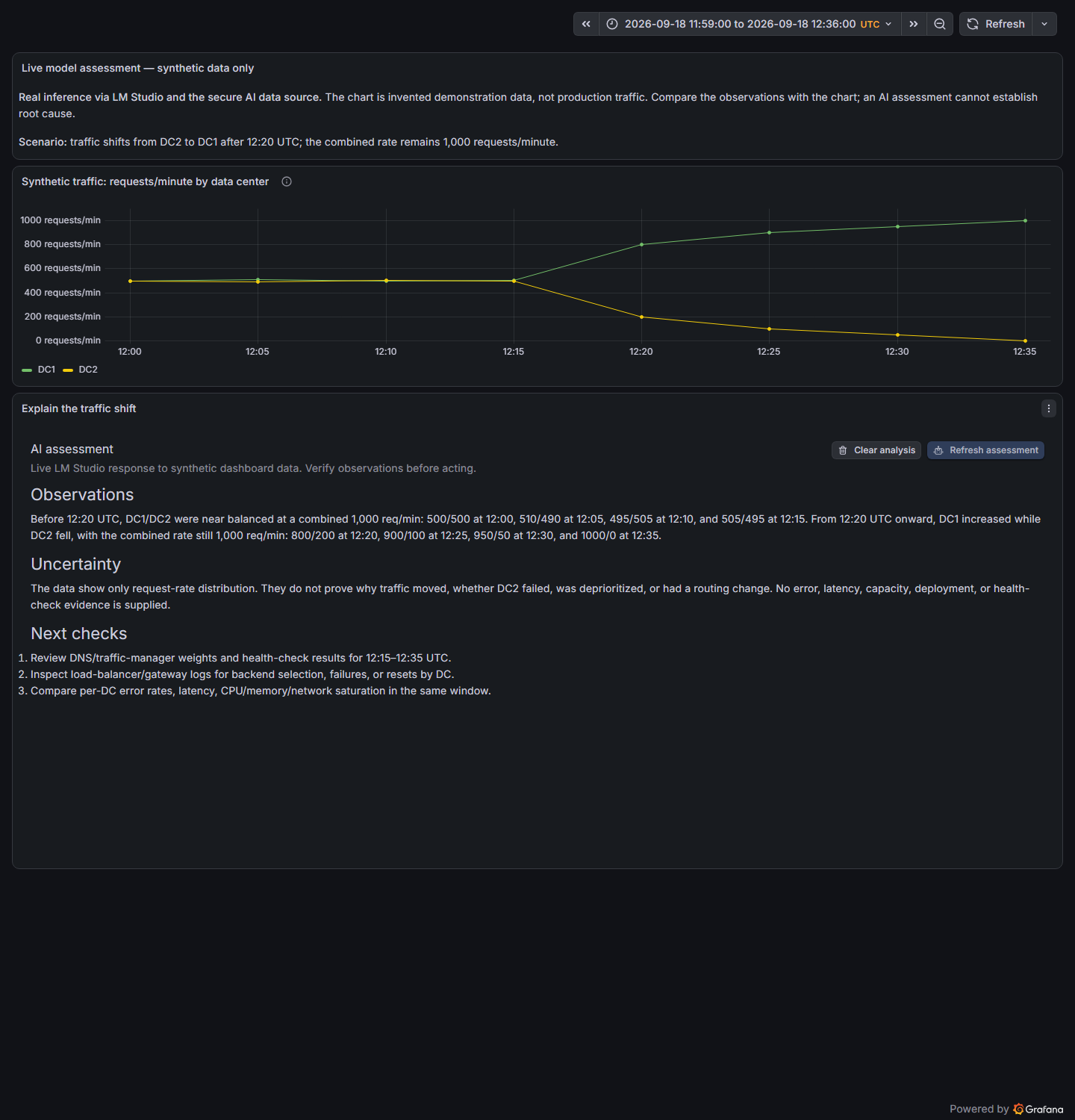
Example of the two plugins working together: the panel presents a local LM Studio assessment of synthetic data; this data source provides the server-side model connection. The chart and assessment are panel content, not a visualization supplied by the data source.
What you can configure
- A shared provider connection. Reuse a configured instance across Intelligence Gateway panels, or create separate instances for different providers and teams.
- Server-side credentials. Store the provider API key or bearer token in Grafana's secure fields. Saved credentials show configured/reset state rather than their stored values.
- Model selection. Set a default model and an optional allow-list of models that panels may request. An empty list permits only the default model; model discovery shows only permitted IDs.
- Image analysis. Optionally allow previewed PNG/JPEG panel or dashboard captures, restricted to explicitly approved image-capable models. Image sending is disabled by default and follows strict count, size, and dimension limits.
- Request limits. Set a server-side timeout and, for Chat Completions providers, an output-token ceiling. A panel cannot raise that ceiling. Copilot Studio response and generation policies are controlled by the agent.
- Transport policy. Use HTTPS by default. An explicit Allow insecure HTTP override supports controlled HTTP-only environments, with the transport risks described below.
The backend also limits request/response sizes and applies per-instance rate and concurrency controls. Provider billing limits remain important; output-token and request limits are not a monetary budget.
Reasoning and visible output can share the model's token budget. If the model stops while reasoning, increase the panel budget within the administrator ceiling or select an appropriate model/configuration. Asking for a concise answer does not reserve tokens for that answer. Request timeouts are separate limits; extending the panel timeout cannot extend a shorter provider deadline.
Requirements and installation
Requires Grafana 11.6 or later, an AI provider reachable from the Grafana server, and the Grafana Intelligence Gateway panel for the intended dashboard experience. Provider access, available models, and any usage charges are managed separately.
The optional Grafana LLM connection requires the configured grafana-llm-app on Grafana 13 or later and a service-account token with access to that app. The Copilot Studio preview connection requires an approved published agent, Direct Line channel secret, correlated text replies, and an explicit completion signal; it does not implement interactive end-user sign-in or enterprise SSO. See provider setup for the supported routes and authentication boundaries.
Install both plugins into the same Grafana installation. They are separate plugin packages, installed side by side in Grafana's configured plugins directory—not inside one another. A configured data-source instance must be available in the same Grafana organization as the dashboard.
See the installation and plugin-placement guide for release installation, Docker paths, and unsigned review environments. Installing the plugin does not create or configure a provider connection automatically.
Connect your first panel
For a two-phase trial, first use the supplied mock for a credential-free delivery check. Keep that instance unchanged, then follow this checklist to add a separate real AI connection. The quick-start guide separates the mock test from genuine inference.
- In Connections → Data sources, add Intelligence Gateway Secure AI.
- Choose the provider and enter its base URL and exact default model or agent alias. Chat Completions URLs commonly end in
/v1; Open WebUI, Grafana LLM, and Copilot Studio have provider-specific paths shown in the configuration guide. The URL must be reachable from the Grafana server or container. - Enter the required credential in its secure field. Set an allow-list that includes the default, a timeout, and supported generation limits. For images, separately enable Enable image analysis and fill Allowed vision models with verified image-capable models or the approved agent alias.
- Select Save & test. This checks the model endpoint, or exchanges a Direct Line channel token for Copilot Studio. It does not send an assessment prompt, test image understanding, or prove end-user authentication.
- Add or edit a Grafana Intelligence Gateway panel. For data-only or combined analysis, configure Queries—for example, select Dashboard and an existing source panel. Confirm the time range contains data.
- Under AI provider → Secure AI data source, select the instance you just configured. Choose Load models securely, select an allowed model, and set the analysis instructions. Select Analyze for data only, or Images to capture/upload, preview, and then explicitly Analyze images.
Do not select this AI data source as the panel's metric source when your intention is to analyze another panel's data. The metric/query connection and the AI provider connection are separate. The panel integration guide explains both selectors.
The provider URL is reached from the Grafana server/container, not your browser. For example, LM Studio on a Docker Desktop host can use http://host.docker.internal:1234/v1 when it accepts connections from that container. A provider on another machine needs its reachable network address. localhost inside Docker refers to the container itself. Use HTTPS, or approve the HTTP override only for a trusted connection. Leave the credential blank only when the provider is intentionally configured without authentication.
Security and compatibility
Provider requests run on the Grafana server. Selected query data, prompts, operational context, and explicitly attached images are sent to the configured provider. Choose a local or hosted endpoint according to your organization's data-handling requirements, and restrict who can edit and query the data-source instance. Preview captures before sending: images can contain visible labels, annotations, or other sensitive information.
Prefer HTTPS. Allow insecure HTTP disables the HTTPS requirement for that instance regardless of hostname or IP classification. Use it only with appropriate trusted-network and firewall controls: prompts, responses, and credentials can otherwise be intercepted in transit. It is not a way to bypass certificate validation for an HTTPS endpoint.
Credentials use the provider's API key or bearer token, or a dedicated Direct Line channel secret for Copilot Studio. Grafana LLM calls run as the configured service account, not the dashboard viewer. OAuth client-credentials exchange, interactive end-user SSO, and streaming responses are not supported. Custom providers and models must support the request format used by the gateway; text compatibility does not establish image support.
The query editor can also submit a supplied prompt and return an answer as a Grafana data frame, but it does not automatically collect other panels' data. Generated assessments require human verification and do not establish root cause or perform remediation.
Documentation and support
- Installation and quick start
- Provider configuration and provisioning
- Security and secret storage
- Companion panel documentation
- Worked example with real-provider screenshots
- Report an issue
- Source code and releases
When reporting a problem, include Grafana and plugin versions, provider type, and the sanitized error. Do not include credentials or sensitive query data. The credential-free reviewer environment returns an explicitly labeled mock receipt; it does not perform AI inference.
Apache-2.0. Developed by DigitalRCS.

Grafana Cloud
Connect any plugin in Grafana Cloud.
- 150+ data source integrations
- Grafana Assistant - AI that correlates your data, builds queries, and answers questions
- 10k Prometheus metrics + 50 GB logs, traces, and profiles on the free tier
- ...and more
Insights
- Activity
Last updated 30 Oct 2026.
1 release in the past year.
- Queries
0 total queries served across all Grafana Cloud instances.
- Version
- 1.1.2
- Dependencies
- Grafana >=11.6.0
- Developer
- DigitalRCS
Grafana Cloud
Connect any plugin in Grafana Cloud.
- 150+ data source integrations
- Grafana Assistant - AI that correlates your data, builds queries, and answers questions
- 10k Prometheus metrics + 50 GB logs, traces, and profiles on the free tier
- ...and more